

The humble WordPress sitemap holds the secret to brilliant internal linking – if only extracting usable data from it wasn't such a monumental pain in the backside. Most SEO professionals have spent countless late nights hunched over spreadsheets, manually copying and pasting URLs and titles while questioning their life choices as their coffee grows cold.
I've been there myself. Far too many times, actually.
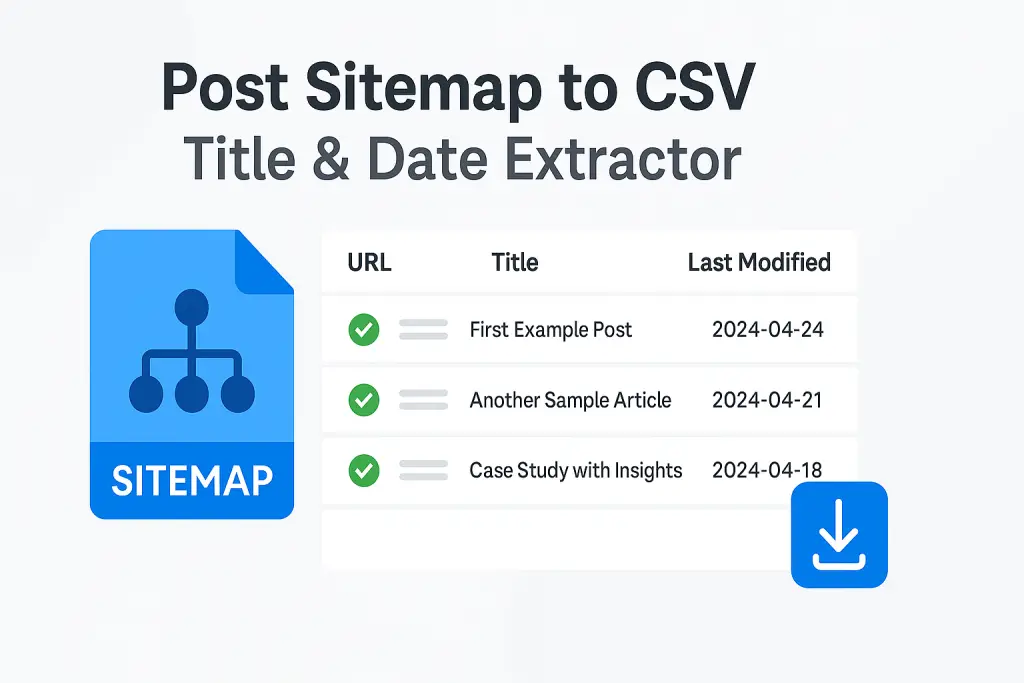
That's precisely why we built the Post Sitemap to CSV tool – because life's genuinely too short for manual data entry, and your time's better spent on literally anything else. This free Post Sitemap to CSV converter extracts not just URLs, but also the actual H1 headings from each page, giving you a comprehensive content inventory in seconds rather than hours.
The Problem This Tool Solves
Let's be honest about something: internal linking is a critical part of SEO, but it's also mind-numbingly tedious to implement properly. Especially when you've got more than a handful of blog posts.
You need to know:
- What content you already have
- What each article is actually about (not just its URL)
- Which pieces should link to each other
- Where the natural opportunities for those links exist
If you've been keeping up with our Master WordPress SEO for Faster Indexing guide, you'll know just how important proper site structure is. But implementing it? That's where most site owners get stuck.
The first two points alone can eat up hours of your time if you're doing it manually. I once spent an entire Sunday afternoon extracting URLs and titles for a client with 87 blog posts. By the end, I was having existential conversations with my houseplants and contemplating a career change to sheep farming. (Spoiler: I stuck with web development, but I still occasionally browse farm real estate listings after particularly grueling spreadsheet sessions.)
Thankfully, our Post Sitemap to CSV tool completely eliminates this mind-numbing work by automatically crawling your XML sitemap and extracting the data you actually need. It turns what used to be a 3-hour ordeal into a 30-second task. That's not an exaggeration – I timed it!
What Makes This Tool Different
Step 1: Understanding What's Special About This Tool
Most sitemap tools just scrape the basic XML data and call it a day – giving you URLs but not much else useful.
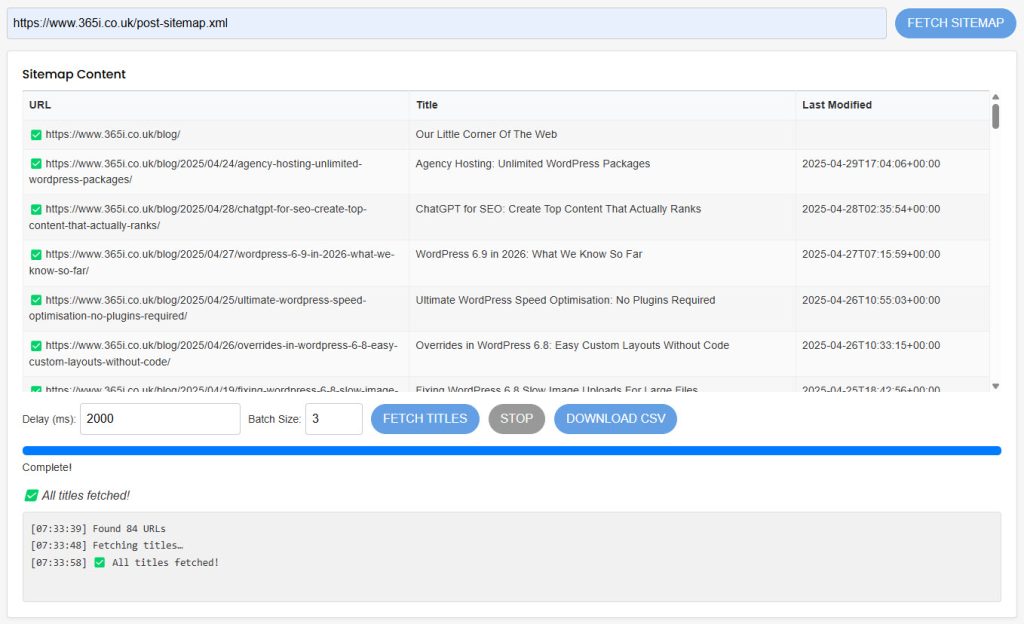
Our Post Sitemap to CSV tool does something crucially different: it actually visits each URL in your sitemap and extracts the H1 heading directly from the page. If there's no H1 (tsk tsk), it falls back to the title tag.
Why does this matter? Because your H1 is what actually defines what your content is about – both for human readers and for search engines. And very often, it doesn't match exactly what's in your sitemap XML or meta title tag.
"The H1 tag, or the main heading of your page, should clearly communicate the primary topic of your content. It's one of the strongest on-page SEO signals and should align with searcher intent." — Moz's On-Page SEO Guide
In other words, you're getting the actual content topics, not just some metadata that might be outdated or optimized differently. If you've been experimenting with our Free SEO Locations Plugin, you'll appreciate how important accurate content mapping is for proper site structure optimization.

How to Use the Post Sitemap to CSV Tool (It's Ridiculously Simple)
Step 2: Finding Your Sitemap URL
First, you need to locate your WordPress sitemap URL. Typically it will be:
https://yourdomain.com/post-sitemap.xmlif you're using Yoast SEOhttps://yourdomain.com/sitemap_index.xmlif you're using Rank Mathhttps://yourdomain.com/sitemap.xmlfor many other SEO plugins
If you're new to WordPress or struggling with this step, check out our Creating a WordPress Website: A Beginner's Guide for more help with the basics.
Not sure? Simply add /sitemap.xml to your domain and see what happens. Most SEO plugins will redirect you to the right place.
Note:
Use the sitemap that contains URL's to posts or pages. Not a list of other sitemaps!
Step 3: Using the Tool
- Go to 365i's Post Sitemap to CSV tool
- Paste your XML sitemap URL into the input field
- Click "Extract Data"
- Wait briefly while the sitemap extractor works its magic (it's crawling each URL – impressive, right?)
- Download your CSV file with all your posts, URLs, and H1 titles
And... that's it. Really.
In the time it would take you to manually copy the first three URLs and titles, you've got your entire site's content mapped out in a tidy spreadsheet. It's like hiring a virtual assistant who works at the speed of light and never asks for coffee breaks.

Supercharging Your Content Strategy with AI
Step 4: Feeding Your CSV to AI Tools
This is where things get properly exciting. That CSV file you just downloaded from the Post Sitemap to CSV tool? It's pure gold for AI content tools.
Here's how you can use it with popular AI writing assistants:
With ChatGPT or Claude:
- Start a new chat
- Upload your CSV file or paste its contents
- Ask something like: "Based on these existing posts, what internal linking opportunities should I add to my new article about [topic]?"
With SurferSEO:
- Import your CSV when creating a new article
- Use the "Internal linking" tab to identify connection opportunities
- Get suggested anchor text based on your actual content (not just keywords)
If you're interested in more AI writing strategies, our guide on AI Writing Tools & SEO: How SurferSEO Elevates Content Creation goes even deeper into maximizing these tools.
With Jasper AI:
- Upload your CSV to your Assets library
- Reference it when creating new content
- Ask: "What topics have I already covered extensively, and where are the gaps?"
With WordLift:
- Import your CSV to create a content inventory
- Use their AI to generate a knowledge graph of your content
- Identify semantic connections you might have missed
For those really looking to level up their content game, our recent post on Master AI Blog Posts: 8 Steps to Engaging Content pairs perfectly with this sitemap extraction tool.
I tested this approach with Claude last week, and the suggestions were spookily good – almost like having an SEO expert who'd read every single article on our site (which, let's be honest, even I haven't done recently).
"ChatGPT is incredibly powerful for content strategy when you give it context about your existing content. It can identify topical gaps, suggest internal linking opportunities, and even help structure content clusters." — Search Engine Journal, April 2025
Step 5: Creating an Internal Linking Strategy
With your CSV and AI assistance, you can now:
- Identify content clusters that should be linked together
- Find older posts that deserve more internal links
- Discover posts that need updating based on their last modified date
- Map out a proper site structure based on topics, not just categories
Want to take your SEO even further? Our guide to ChatGPT for SEO: Create Top Content That Actually Ranks shows you exactly how to use AI to analyze and optimize your site structure.
One of our clients used this exact process to boost their organic traffic by 27% in just two months – not by creating new content, but by properly connecting what they already had. The ROI on that is... well, mathematically beautiful.

Beyond Internal Linking: Creative Uses for Your Sitemap CSV
Your WordPress sitemap data isn't just for internal linking. Here are some other genius ways to leverage our Post Sitemap to CSV extractor:
Content Audit: Sort by last modified date to quickly identify content that hasn't been updated in ages. I recently found a post from 2022 that still talked about "post-pandemic marketing challenges" – yikes!
Topic Gap Analysis: A visual scan of your H1 titles can reveal obvious content gaps. One of our clients realized they had 12 posts about email marketing but nothing about SMS marketing – an easy win for new content.
Seasonal Content Calendar: Filter by publish date to identify seasonal content you can refresh and republish. That "Valentine's Day Marketing Ideas" post from last year? Perfect template for this year with some updates.
AI Training: Use your CSV as training data for AI to understand your brand voice and topics. This helps tools like ChatGPT generate more on-brand content suggestions.
Security Assessment: Review your content inventory to find pages that might need security updates. Our guide on WordPress Security Risks & Maintenance explains why this matters more than most site owners realize.
XML Sitemap Health Check: Comparing your extracted H1s with your meta titles can reveal inconsistencies in your on-page SEO. I've used the Post Sitemap to CSV tool to identify mismatches that were hurting our clients' search performance without them even realizing it.

Real Results from Real Users
Don't just take my word for how useful the Post Sitemap to CSV tool is. Here's what people are saying about it:
"I spent three hours last month manually creating a content inventory. This tool did the same job in about 30 seconds. Actual magic."
— David Granger, Local SEO consultant
"The fact that it pulls the actual H1s instead of just XML data made all the difference for our content audit. We identified title inconsistencies we never would have caught otherwise."
— Mark Roberts, Digital marketer
Why We Built This Tool
Full transparency: we built this Post Sitemap to CSV extractor because we needed it ourselves. At 365i, we manage dozens of WordPress sites with hundreds of posts each. The manual process of inventorying content was driving us slightly mad.
So our lead developer (after watching me mutter darkly at a spreadsheet for the third evening in a row) said, "Why don't we just build something to do this automatically?"
And thus, a tool was born. We've been using it internally for months, and it's saved us countless hours of tedium. Now we're sharing it with you because, well, spreadsheet misery loves company – or rather, spreadsheet misery should be eliminated whenever possible.
One client who manages a recipe blog with over 500 posts told me it would have taken her literally all week to manually extract what our tool did in under a minute. The look on her face when I showed her the Post Sitemap to CSV tool was worth every hour we spent developing it.

Ready to Transform Your Internal Linking?
Give the Post Sitemap to CSV tool a try. It's free, it's fast, and it might just save your sanity. I'd love to say we built it after extensive market research, but honestly? We built it because I was tired of copying and pasting URLs at 2 AM while muttering obscenities at my laptop.
Speaking of speed, if your WordPress site is feeling sluggish, our Ultimate WordPress Speed Optimisation: No Plugins Required guide pairs perfectly with better internal linking. After all, what's the point of connecting all your content if visitors bounce before it loads?
And if you're running a web design agency, our Agency Hosting: Unlimited WordPress Packages can help you manage multiple client sites with this kind of sitemap optimization.
For those who want the full performance package, our Global CDN: Why 365i's Free Solution Outperforms the Competition explains how we deliver lightning-fast speeds worldwide.
"The Post Sitemap to CSV tool saved us hours of manual work. It's one of those simple utilities that once you use it, you wonder how you ever lived without it." — Steve Goddard
Because at the end of the day, working smarter beats working harder every time – especially when spreadsheets are involved. So go ahead, give our Post Sitemap to CSV extractor a whirl, and reclaim those hours of your life that would otherwise be spent on mind-numbing data entry.
Have you tried the Post Sitemap to CSV tool? Let us know how it's working for you in the comments below!
What is the purpose of the Post Sitemap to CSV tool and who should use it?
The Post Sitemap to CSV tool automates the extraction of URLs and H1 headings from WordPress sitemaps to enhance internal linking strategies. It is ideal for SEO professionals, content marketers, and website owners aiming to streamline their internal linking efforts.
How does the Post Sitemap to CSV tool set itself apart from standard sitemap extractors?
This tool distinguishes itself by retrieving actual H1 headings, not just XML data, and seamlessly integrating with AI tools for advanced internal linking. By saving time, providing content intelligence, and offering strategic advantages, it surpasses traditional sitemap extraction tools.
What are the steps to utilize the Post Sitemap to CSV tool effectively?
Step 1: Identify your sitemap URL.
Step 2: Use the tool to extract URLs and H1 headings.
Step 3: Employ the CSV file for tasks like content audits and AI training.
The process is simple, saving time and enhancing efficiency.
How can the Post Sitemap to CSV tool enhance content strategy through AI integration?
By providing the CSV to AI writing assistants, users can optimize content, analyze topic gaps, plan seasonal content, and improve security assessments. This fusion of sitemap data and AI tools elevates content strategies to a higher level of efficiency and effectiveness.
What are the diverse applications of the sitemap CSV beyond internal linking?
In addition to internal linking, the sitemap CSV can be used for content audits, topic gap analysis, seasonal content planning, AI training, security assessments, and checking XML sitemap health. This versatile data source opens up numerous possibilities for content optimization and strategy refinement.
What are the tangible benefits of using the Post Sitemap to CSV tool?
Users witness improved content mapping processes, time savings on manual tasks, comprehensive content inventories, strategic insights through content intelligence, and evolution of SEO strategies with AI tools. The tool streamlines workflows effectively, saving hours of manual work and enhancing overall efficiency.
What inspired the creation of the Post Sitemap to CSV tool?
The tool was developed to simplify the laborious task of WordPress content mapping into a quick 30-second process, sparing users from tedious data entry. Its goal was to offer a time-saving solution with creative and strategic uses beyond basic sitemap extraction for internal linking.
How does the Post Sitemap to CSV tool revolutionize internal linking and content strategy?
By automating URL and H1 heading extraction from WordPress sitemaps, the tool accelerates internal linking strategies and content optimization processes. This transformation allows users to focus on strategic content decisions rather than manual data entry, ultimately enhancing their SEO endeavors.
What advantages come from using the Post Sitemap to CSV tool with AI writing assistants?
Integrating the tool with AI writing assistants enables users to enhance content, conduct thorough audits, perform topic gap analysis, plan seasonal content, improve security assessments, and check XML sitemap health. This collaboration boosts content quality, refines strategies, and enhances overall efficiency.
How can the extracted CSV benefit content audits, topic analysis, seasonal planning, AI training, security checks, and sitemap health?
The CSV data, extracted using the tool, serves as a valuable resource for conducting detailed content audits, identifying topic gaps, planning seasonal content, training AI models, assessing security aspects, and ensuring XML sitemap health. This comprehensive data source enhances various aspects of content management and strategy.
Learn more about our WordPress Hosting.
About the author: This post was written by Mark McNeece, founder of 365i and McNeece Web Design. When not creating tools to automate tedious SEO tasks, he can be found optimizing WordPress sites and occasionally daydreaming about that sheep farm.


